
SLA Module
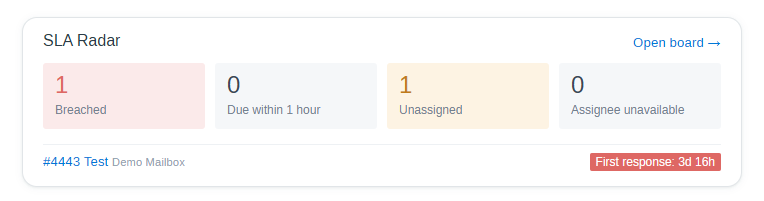
Service level agreements for FreeScout: response and resolution targets (per mailbox), conversation priorities, SLA states, a dashboard radar, an SLA board, reports, and integration with the Workflows, Tags and Out of Office modules (Workflows, Tags, Out of Office are optional).
Features
- SLA policy per mailbox with targets for three clocks: First Response, Next Response and Resolution, set separately for every priority level.
- SLA states of a clock: within target, at risk, critical, breached, met, missed, cancelled.
- Pause of the clocks while a conversation is Pending.
- Reports: “compliance” and “median times” by mailbox, priority and assignee, CSV export.
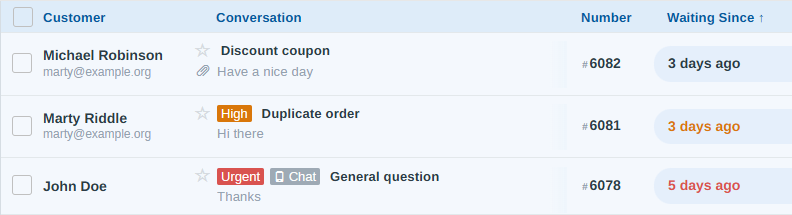
- Workflows: conditions by SLA state and priority, additional actions: “Set Priority” and “Assign to the least loaded available agent”.
- Tags: SLA states are mirrored to tags.
- Out of Office: unavailable assignees are flagged and skipped when assigning.
SLA Policies
SLA policies are configured on a per-mailbox basis under Mailbox » Settings » SLA (administrators only).
Every tracked conversation has up to three clocks. The time is counted around the clock (24×7).
| Clock | Starts | Stops |
|---|---|---|
| First response | A customer creates a conversation | The first public reply of a human agent |
| Next response | A customer writes and nobody is answering yet | A reply of a human agent |
| Resolution | A customer creates a conversation, or a customer replies to a conversation without a running resolution clock (reopened or started by an agent) | The conversation is closed |
Rules:
- Only email and chat conversations are tracked. Conversations created by an agent and phone conversations get clocks only after the first customer reply. Spam and deleted conversations are not tracked.
- Replies of robots (Workflows) and auto replies do not stop the response clocks. Notes do not stop them either.
- If a customer writes again before an answer, the running clock continues, a new one is not started. After an answer every customer message starts a new “next response” clock.
- If a conversation is closed without an answer, the response clocks are cancelled. If it is closed with an answer of an agent, they are completed by that answer.
- A reopened conversation gets a new resolution clock (the cycle number is increased).
- While a conversation is Pending the clocks are paused (if enabled in the policy), the time on pause is not counted.
- Changing the priority recalculates the running clocks with the targets of the new level (the start of the clock does not change).
- Moving a conversation to another mailbox cancels its running clocks and starts new ones with the policy of that mailbox. Restoring a deleted conversation starts new clocks as well.
- Turning off the policy of a mailbox cancels its running clocks the next time they are processed.
- Once a clock is breached it stays breached, even if the time on pause is added afterwards.
SLA States
| State | Meaning |
|---|---|
| Within target | Running, less than the “at risk” threshold has passed |
| At risk | The “at risk” threshold has been reached |
| Critical | The “critical” threshold has been reached |
| Breached | The target time has passed, the clock is still running |
| Met | Completed within the target |
| Missed | Completed after the target |
| Cancelled | Spam, deleted, moved, SLA disabled, closed without an answer |
SLA Board
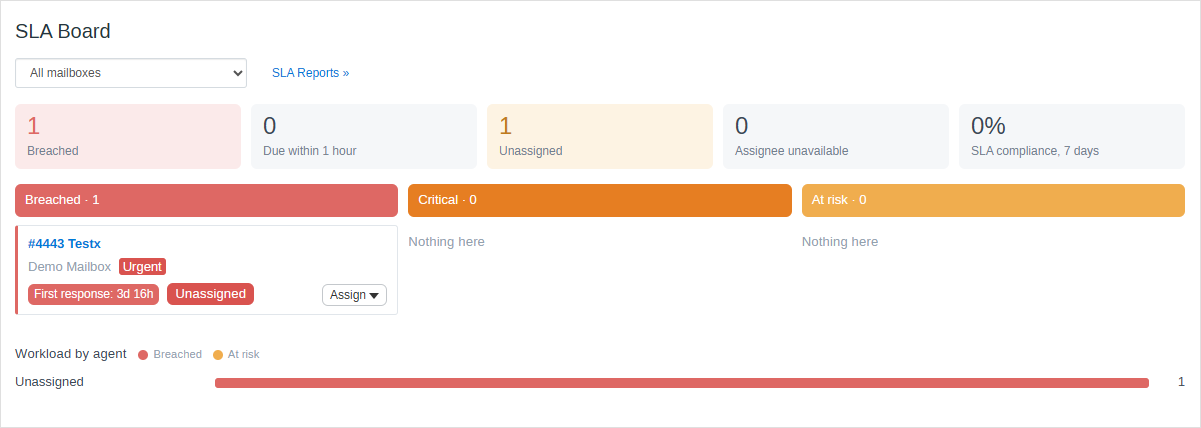
- The same numbers as in the radar plus SLA compliance for 7 days and filter by mailbox.
- Three columns: Breached, Critical, At risk (up to 30 cards in a column, the rest is counted).
- The Assign list in a card. Unavailable agents (Out of Office) are disabled.
- Workload by agent: the number of breached and at risk conversations of every agent (up to 8 rows, unassigned first).
- The board is reloaded every 60 seconds (not while a list is open).
SLA Reports
Reports are available in Manage » SLA Reports (administrators only).
A report is built from the latest 50 000 completed clocks, the report warns if the data is truncated.
Tags
If the Tags module is active, tags are attached and removed automatically:
sla-at-risk– at risk and critical;sla-breached– breached.
A tag removed by hand comes back at the next change of the state. Names and the switch are configured in the .env file.
Out of Office
Used for the “assignee unavailable” number, to disable agents in the Assign list and to skip them in the “least loaded” action. Availability of an agent does not pause the clocks: the obligation to the customer remains.
Configuration (.env)
| Variable | Default | Description |
|---|---|---|
APP_PRIORITIES |
1:Low:9eaab5,2:Normal, 3:High:d9770a,4:Urgent:d9534f |
Priority levels, see below. |
APP_PRIORITY_DEFAULT |
2 |
Key of the level used for conversations without priority. If the level does not exist, the first level is used. |
SLA_PROCESS_CRON |
* * * * * |
How often the clocks are checked (cron expression). |
SLA_PROCESS_LIMIT |
500 |
Maximum number of clocks processed in one run of freescout:sla-process. |
SLA_TAGS_ENABLED |
true |
Mirror SLA states to tags (requires the Tags module). |
SLA_TAG_AT_RISK |
sla-at-risk |
Name of the tag for the “at risk” and “critical” states. |
SLA_TAG_BREACHED |
sla-breached |
Name of the tag for the “breached” state. |
After changing the .env file clear the cache in “Manage » System » Tools”.
Priority levels
Levels are set in the APP_PRIORITIES variable as a comma-separated list of key:Name or key:Name:color items:
APP_PRIORITIES="1:Low:9eaab5,2:Normal,3:High:e08e0b,4:Urgent:d9534f"- Key is a number from 1 to 255. Do not change the key of a level which is in use. Names and colors can be changed at any time, levels can be added and reordered.
- Name is translated if a translation exists.
- Color is optional, six hexadecimal digits with or without
"#" symbol:f0ad4e or#f0ad4e. - A conversation without priority (or with a level which does not exist anymore) has the default level.
- Use quotes (‘) around the value if it contains spaces.
A level without a color is displayed with the standard gray style. The default level is not shown in the conversations list.
Eventy Actions
- Eventy action:
sla.state_changed($conversation,$clock,$prev_state,$new_state) – fired when a clock changes its state or is completed. - Eventy action:
conversation.priority_changed($conversation,$user,$prev_priority) – fired by the core.
Troubleshooting
- Priority colors are not displayed. Check the format of
APP_PRIORITIES(six hexadecimal digits) and clear the cache. The default level is not colored in the conversations list on purpose. - Clocks do not move to the next state. Check that the FreeScout scheduler runs every minute and look at the output of
php artisan freescout:sla-process. - The board is empty after enabling a policy. Clocks start for new messages; run
freescout:sla-backfillfor conversations which are already open.